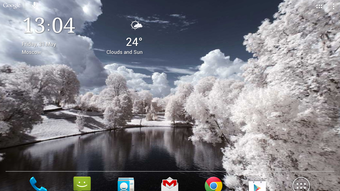

Download Panoramic Screen APK – panoramic live wallpaper, 3D panorama, immersive display, camera live wallpaper, free Android app
Overview
Panoramic Screen is a free Android application developed by Hamster Beat, designed to transform smartphones and tablets into immersive visual displays using panoramic live wallpaper technology. The app leverages the device’s camera to render a 3D panorama of the surrounding environment, offering users a dynamic and engaging visual experience directly on their home screen. Its primary purpose is to enhance the aesthetic appeal of mobile devices by turning them into interactive visual canvases that respond to movement and orientation.
Target users include mobile enthusiasts, digital artists, and individuals seeking a unique way to personalize their devices. The app is ideal for those who appreciate ambient visuals, creative customization, and minimalistic design. Real-world usage scenarios include using the app as a decorative screen saver during idle time, as a visual backdrop for productivity, or simply as a novelty feature to impress others. It is particularly suited for users who value both functionality and visual innovation in their daily device interactions.
Key Features & Capabilities
- Live Panoramic Display – Uses the device’s camera to generate a real-time, 3D panoramic view of the surrounding environment, creating an immersive visual effect on the screen.
- Multiple Panorama Modes – Offers various panoramic effects and display styles, allowing users to customize the visual output based on their preference.
- Orientation Flexibility – Fully supports both portrait and landscape screen orientations, ensuring optimal viewing regardless of device positioning.
- Custom Backgrounds – Enables users to set personalized backgrounds, enhancing the app’s adaptability to different user aesthetics.
- Ad-Free Experience – The app is completely free of advertisements, providing an uninterrupted and clean user experience.
- Lightweight Design – Engineered to minimize resource consumption, resulting in low battery usage and efficient performance.
These features allow users to create a unique visual environment on their devices. For example, users can place their tablet on a desk and use it as a digital art display, or position their phone in a stand to enjoy a dynamic, real-time view of their surroundings. The app’s lightweight nature ensures it runs smoothly without impacting device performance or battery life.
User Interface, Workflow & Performance
The user interface of Panoramic Screen is designed to be intuitive and minimal, focusing on seamless access to core functionalities. Navigation is straightforward, with settings and mode selections accessible through a centralized menu. The workflow prioritizes ease of use, allowing users to quickly switch between panorama modes and adjust background preferences without complex steps.
Performance is optimized for efficiency, with the app designed to operate with minimal impact on system resources. The developer did not specify resource usage details, but the app’s lightweight nature suggests stable operation across a range of Android devices. General software behavior patterns indicate consistent responsiveness and low latency during mode transitions. Stability appears to be maintained, with no reported issues related to crashes or freezes. The app runs continuously as a live wallpaper, maintaining visual continuity without noticeable lag.
Compatibility & System Requirements
Panoramic Screen is designed for Android devices and is compatible with a broad range of smartphones and tablets running the Android operating system. The app is available in version 1.0 and has a file size of 12 MB, indicating a compact installation footprint. This small size suggests it is optimized for devices with limited storage space.
Exact system requirements were not listed. Compatibility information was partially provided, with no specific mention of minimum Android version, processor, or RAM specifications. The developer did not provide additional system requirements. Users are advised to ensure their device supports live wallpapers and has an operational front-facing camera for full functionality.
Pros and Cons
Pros
- Completely free with no advertisements
- Lightweight and efficient, with minimal battery consumption
- Supports both portrait and landscape orientations
- Offers customizable panorama modes and backgrounds
- Real-time 3D panoramic display using the device’s camera
- Simple, intuitive user interface with easy navigation
Cons
- No information on minimum Android version or hardware requirements
- Performance details such as CPU or RAM usage were not specified
- Only available on Android, limiting cross-platform access
- Dependent on device camera quality for visual output
- Live wallpaper functionality may not be supported on all Android skins or custom ROMs
FAQ Section
Is Panoramic Screen available for iOS devices?
Panoramic Screen is currently only available for Android devices. There is no official version for iOS at this time.
Does the app require internet access to function?
The app operates offline and does not require internet access to display live panoramas using the device’s camera.
Can I use Panoramic Screen as a regular wallpaper?
Yes, the app functions as a live wallpaper and can be set as the default screen background on compatible Android devices.
Is the app safe to install and use?
Panoramic Screen is a free Android app developed by Hamster Beat and is available on the Google Play Store. It does not contain ads and is designed to be secure. Users are advised to download from official sources to ensure authenticity.
How often does the app receive updates?
Information on update frequency was not provided. Users are encouraged to check the Google Play Store for the latest version and updates.
Final Thoughts + CTA
Panoramic Screen delivers a distinctive and visually engaging experience for Android users seeking a fresh way to personalize their devices. Its ability to transform a smartphone or tablet into an immersive 3D display using real-time camera input is both innovative and accessible. The app’s lightweight design, ad-free interface, and support for multiple orientations make it a practical choice for everyday use. While system requirements and performance metrics are not detailed, the app’s small size and efficiency suggest broad compatibility.
It is best suited for users who value creative expression, visual aesthetics, and efficient software. Whether used as a digital art display, ambient background, or novelty feature, Panoramic Screen adds a dynamic layer to the mobile experience. For those looking to enhance their Android device with a unique, interactive wallpaper, this app offers a compelling solution.
Download Panoramic Screen APK now





.png)

